Organise · Select
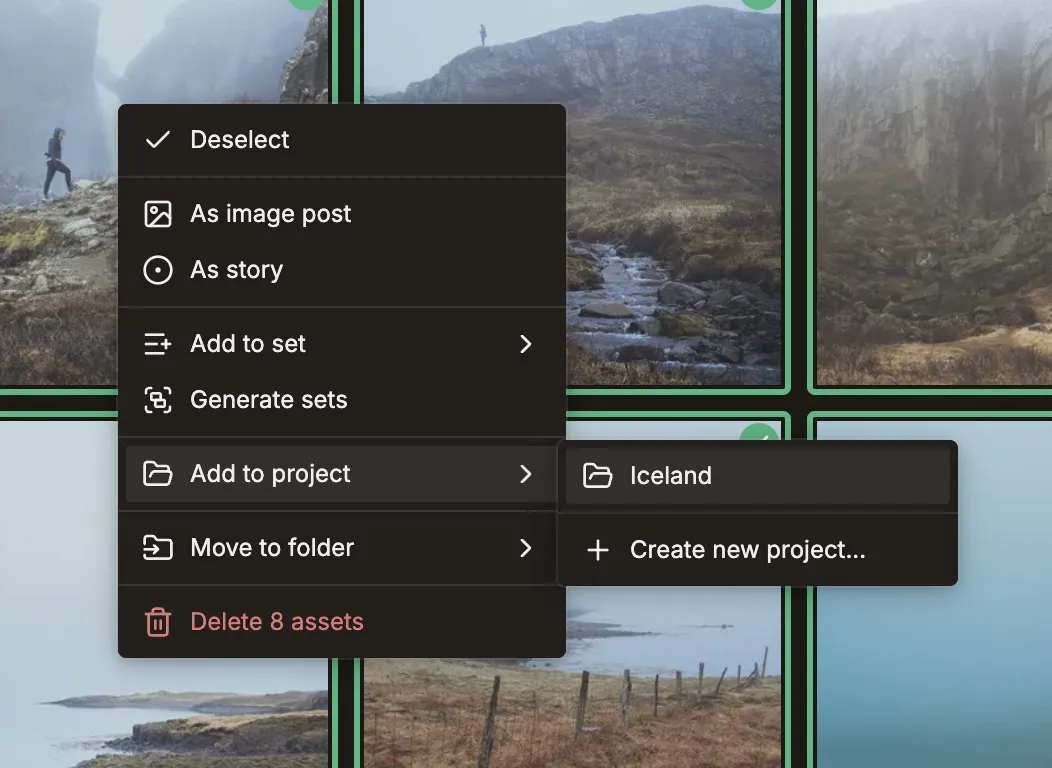
Right-click to organise
Select frames in the library and send them straight into a set or a project — organising starts from a single menu.
Keep the folders your photos arrived in, group the keepers into sets, and gather those sets into a project — so a shoot of hundreds stays findable, and one click turns it into a week of posts.
Folders carry context in from import, sets become the unit you post, and a project gathers it all — nothing is duplicated, nothing gets lost.
Select frames in the library and send them straight into a set or a project — organising starts from a single menu.
Send a shoot from Lightroom and Published keeps the directory it lived in — name, path, and parent folders — attached to every frame.
AI reads your folder names and hierarchy to infer the event, location, date, and subject — so imports arrive already understood.
Multi-select in the library and Add to Set. A set is a named, ordered group of photos that belong together — the unit a post gets built from.
Hand Published a selection and it groups the frames into sets for you — photos that belong together, batched in one step.
A project holds many sets plus any loose assets — a whole wedding or launch in one place. Add, remove, or move assets as the shoot evolves, then roll the whole project into drafts when it's ready.
The folder a photo came from travels with it, so a set knows where it belongs. Sets gather into a project, and loose assets can ride along too. The same photo lives in a set and a project at once — grouped, never copied.
If yours isn't here, the team replies within a day.
Once a project holds your sets, batch rolls the whole thing into drafts in one action — organising first is what makes that one click.
Explore batch →Lightroom & Eagle pluginsSend selects from Lightroom with their folder structure attached — directory, path, and tags arrive with the photo, no re-tagging.
Explore the plugins →Framing & FormatsA set you grouped here is a carousel waiting to be framed — focal-point crops per format, uncropped borders, split panoramas, and one look across every slide.
Explore framing & formats →Bring one shoot. Keep its folders, group it into sets, and gather them into a project ready to post.